
At a glance
- Technology
- Active infrared, 40 kHz, bidirectional
- Supply Voltage
- 3 batteries, type Micro/AAA 1.5 V
- Operating Temperature
- -20 to +40 °C
 Model RegloBeam 2Current model
Bircher RegloBeam 2 Bidirectional Infrared Remote Control for Sensor Setup
Price on request
At a glance
- Technology
- Active infrared, 40 kHz, bidirectional
- Supply Voltage
- 3 batteries, type Micro/AAA 1.5 V
- Operating Temperature
- -20 to +40 °C
Handheld infrared remote for setting up Bircher sensors such as Herkules 2E from ground level. Two-way link with display, numeric and function keys and a built-in infrared detector; runs on three AAA batteries.
Include the required quantity and configuration in your quote request. Price and availability will be confirmed in the quotation.
- WarrantyManufacturer warranty under Bircher's terms. Warranty claims
- DeliveryPrice, availability and delivery charges are confirmed in your quotation. Shipping and delivery
Overview
What it is
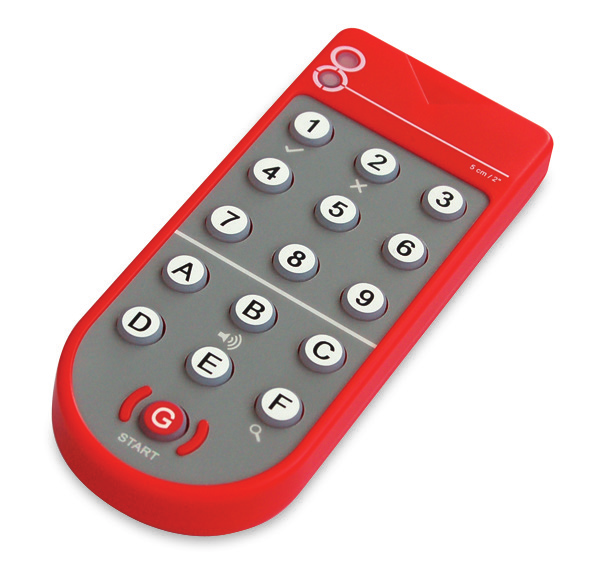
RegloBeam 2 (article 292393) is a bidirectional remote control and AIR detector for sensor setup from BBC Bircher Smart Access. It has a display, numeric keys 1 to 9, function keys A to F and a start key G for starting the unit and establishing the connection to a sensor.
What it is used for
Bircher lists RegloBeam 2 as an accessory for the Herkules 2E microwave motion detector for industrial doors. With it, the sensor can be configured quickly from ground level and every single parameter can be adapted to the situation. The Herkules 2E manual states that RegloBeam 2 is required to access the complete set of functions.
Key features
- Bidirectional link: changes to the settings are signalled back by the sensor to the remote control immediately.
- Sensor scan mode lists the available sensor addresses; selecting an address makes that sensor flash.
- Built-in AIR detector: the display shows green when no active infrared field is detected and red when one is detected, with an optional buzzer.
- Switches itself off after two minutes without a key press.
- Active infrared technology, 40 kHz.
Buying considerations
The remote control can only connect while the sensor is in configuration mode. Configuration mode starts when the sensor is switched on and ends automatically 30 minutes after the last setting. Check the operating instructions of the sensor you are using for the settings it supports.
Installation considerations
To reconnect after configuration mode has ended, briefly press a button on the sensor or briefly interrupt its power supply. Some sensor models can also be reconnected with the access code function on the remote control. Do not point the infrared beam towards your eyes. Bircher states that only trained, qualified personnel may mount and start up the sensors.
Compatibility
Named in the Herkules 2E brochure and manual. The RegloBeam 2 manual refers to the operating instructions of each sensor for its settings, so confirm support for other sensor models in their own documentation.
Technical specifications
Key facts
- What is it?
- Industrial door radar sensorBrand Bircher, model RegloBeam 2
- What is it used for?
- Setup of Bircher sensors from ground level, for example Herkules 2E
- How is it powered?
- 3 batteries, type Micro/AAA 1.5 V
- Which documents are available?
- Manual, brochure, certificate Open documents
- Can SecurityGearHub help with installation?
- Setup guidanceManuals, wiring guides and answers to setup questions. On-site work is arranged separately where available. Ask about installation
- Not stated by the manufacturer
- outdoor rating, box contents
- Technology
- Active infrared, 40 kHz, bidirectional
- Application
- Setup of Bircher sensors from ground level, for example Herkules 2E
- Supply Voltage
- 3 batteries, type Micro/AAA 1.5 V
- Configuration
- Numeric keys 1 to 9, function keys A to F, start key G, display
- Operating Temperature
- -20 to +40 °C
- Ambient Humidity
- Max. 90 %, non-condensing
- Standards
- EU Declaration of Conformity: RoHS 2011/65/EU, EMC 2014/30/EU, WEEE 2012/19/EU
- Warranty
- Manufacturer warranty under Bircher's terms. How claims work
Product attributes and shipping details
| Brand | Bircher |
|---|
Downloads
Documentation
- Herkules 2E Brochure (lists RegloBeam 2)Brochure · This model · 2.9 MBDownload
Certificate and compliance document (1)
- RegloBeam 2 / RC Duo 2 EU Declaration of ConformityCertificate · This model · 384.6 KBDownload
User manual
- RegloBeam 2 Operating InstructionsManual · This model · 886.5 KBDownload
Series documents can differ from your exact model. Report a wrong or missing file
Works with this product
Relevant accessories
- Bircher Herkules 2E Radar Motion Sensor for Industrial DoorsHerkules 2E
Why Accessory for Herkules 2E (RegloBeam 2, article 292393); needed for the complete set of functions.
Price on requestAdd to quote
Questions about this product
Why does RegloBeam 2 not connect to the sensor?
The connection only works while the sensor is in configuration mode. This mode starts when the sensor is powered up and ends 30 minutes after the last setting. Briefly press a button on the sensor or briefly interrupt its power to start it again.
What batteries does RegloBeam 2 use?
Three 1.5 V batteries, type Micro/AAA.
What does the AIR detector show?
The display lights green when no active infrared field is detected and red when one is detected. If the buzzer is switched on, it buzzes constantly while a field is detected.
Ask about this modelSetup, compatibility, what is in the box
Answers are automated. Do not enter personal or account details.
Looking for an alternative?
We list alternatives only when we have checked they suit the same job. Compare other models in the category, or ask us to suggest one for your site.