
At a glance
- RC10 ports
- HDMI out x 1, USB-C power x 1 (5 V, 2 A), USB-A 2.0 x 1
- Screen-sharing resolution
- Up to 4K UHD at 30 fps
- Wi-Fi
- Wi-Fi 5 or Wi-Fi 6, 5 GHz
- Screen-sharing modes
- Mirror and extended desktop
In the box
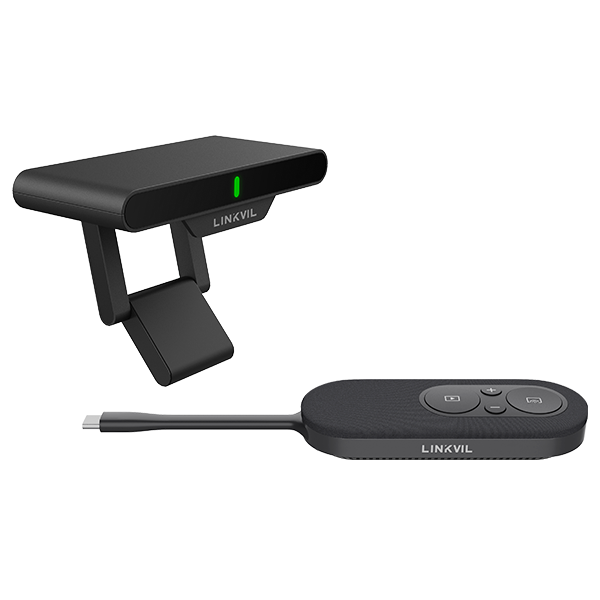
- CP20 screen-sharing pod
- RC10 receiver hub
- Pairing adapter
- 1.5 m HDMI cable
- Power adapter (5 V, 2 A)
- Quick installation guide
 Model CA200Current model
Fanvil LINKVIL CA200 Wireless Screen-Sharing Kit, 4K, CP20 Pod and RC10 Receiver
Price on request
At a glance
- RC10 ports
- HDMI out x 1, USB-C power x 1 (5 V, 2 A), USB-A 2.0 x 1
- Screen-sharing resolution
- Up to 4K UHD at 30 fps
- Wi-Fi
- Wi-Fi 5 or Wi-Fi 6, 5 GHz
- Screen-sharing modes
- Mirror and extended desktop
Wireless screen sharing for meeting rooms and classrooms. Plug the CP20 pod into a laptop USB-C port and press one button to show your screen in up to 4K on the room display. No software to install.
Include the required quantity and configuration in your quote request. Price and availability will be confirmed in the quotation.
- WarrantyManufacturer warranty under Fanvil's terms. Warranty claims
- DeliveryPrice, availability and delivery charges are confirmed in your quotation. Shipping and delivery
Overview
The Fanvil LINKVIL CA200 lets presenters share a laptop screen on the meeting-room display without cables across the table. The kit has a CP20 screen-sharing pod that plugs into the laptop and an RC10 receiver hub that connects to the display by HDMI.
Is it right for you?
Choose it for meeting rooms, training rooms and classrooms where different people present from their own laptops. Sharing starts with one button and needs no software or drivers. Freeze mode keeps the current slide on screen while the presenter works privately on the laptop. Up to three more CP20 pods can be added so several presenters can take turns; one source shows at a time.
Key features
- Screen sharing up to 4K UHD at 30 fps
- Mirror and extended desktop modes
- Freeze button pauses sharing and keeps the current image on screen
- Volume buttons on the pod control the laptop volume
- A USB camera, microphone or speakerphone on the RC10 can be used wirelessly from the laptop
- Up to 4 CP20 pods per RC10 receiver
- WPA3 encrypted 5 GHz link, up to 10 m
What else you need
- A display or projector with an HDMI input
- A laptop with a full-featured USB-C port that supports DisplayPort Alt Mode and USB power delivery
- Extra CP20 pods if more than one presenter needs their own pod
- A USB-A to USB-B cable if you want touch reverse control (not included)
Installation
Connect the RC10 to the display with the HDMI cable and power it with the supplied adapter. It can be fixed magnetically or placed on its universal stand. The pod in the box is pre-paired; extra pods pair with the included pairing adapter.
Before you buy
- The laptop USB-C port must support video output (DisplayPort Alt Mode); a USB-C port for data only will not work
- Wireless channel availability varies by country or region
Technical specifications
Key facts
- What is it?
- Conference Phones & Video ConferencingBrand Fanvil, model CA200
- What comes in the box?
- CP20 screen-sharing pod; RC10 receiver hub; Pairing adapter; 1.5 m HDMI cable and 2 more
- Which documents are available?
- On request. Ask us for the datasheet.
- Not stated by the manufacturer
- power, PoE
General
- Screen-sharing resolution
- Up to 4K UHD at 30 fps
- Screen-sharing modes
- Mirror and extended desktop
- Freeze mode
- Supported
- Software or driver installation
- Not required
- Display output
- HDMI via RC10
- Maximum CP20 pods per RC10
- 4 (3 additional pods sold separately)
- Sources displayed at once
- 1
- Wi-Fi
- Wi-Fi 5 or Wi-Fi 6, 5 GHz
- Wireless distance
- Up to 10 m
- Encryption
- WPA3-PSK
- CP20 connection
- Integrated USB-C cable, 85 mm
- CP20 laptop port requirement
- Full-featured USB-C with USB PD, data and DisplayPort Alt Mode
- CP20 power
- 5 V, 900 mA; 2.5 W
- RC10 ports
- HDMI out x 1, USB-C power x 1 (5 V, 2 A), USB-A 2.0 x 1
- RC10 on-screen languages
- 12
Environment
- Operating temperature
- -10 to 40 °C
- Operating humidity
- 0% to 95% RH
Physical
- Mounting
- Magnetic attachment and universal stand
- CP20 dimensions
- 189 x 40 x 18 mm
- RC10 dimensions
- 102 x 45 x 20 mm
- CP20 weight
- 62 g
- RC10 weight
- 85 g
- Warranty
- Manufacturer warranty under Fanvil's terms. How claims work
Questions about this product
Do presenters need to install software?
No. Plug the CP20 into the laptop USB-C port and press the button.
Will it work with any laptop?
The laptop needs a full-featured USB-C port with DisplayPort Alt Mode and power delivery. A USB-C port for data only will not work.
Can several people present?
Yes. Up to 4 CP20 pods can pair with one RC10, and the screen switches when a presenter presses their button. One source shows at a time.
What display do I need?
Any display or projector with an HDMI input.
Ask about this modelSetup, compatibility, what is in the box
Answers are automated. Do not enter personal or account details.
Looking for an alternative?
We list alternatives only when we have checked they suit the same job. Compare other models in the category, or ask us to suggest one for your site.