
At a glance
- Compatible Phones
- GRP2650, GRP2670
- Mounting
- Wall, two vertical wall mount slots
In the box
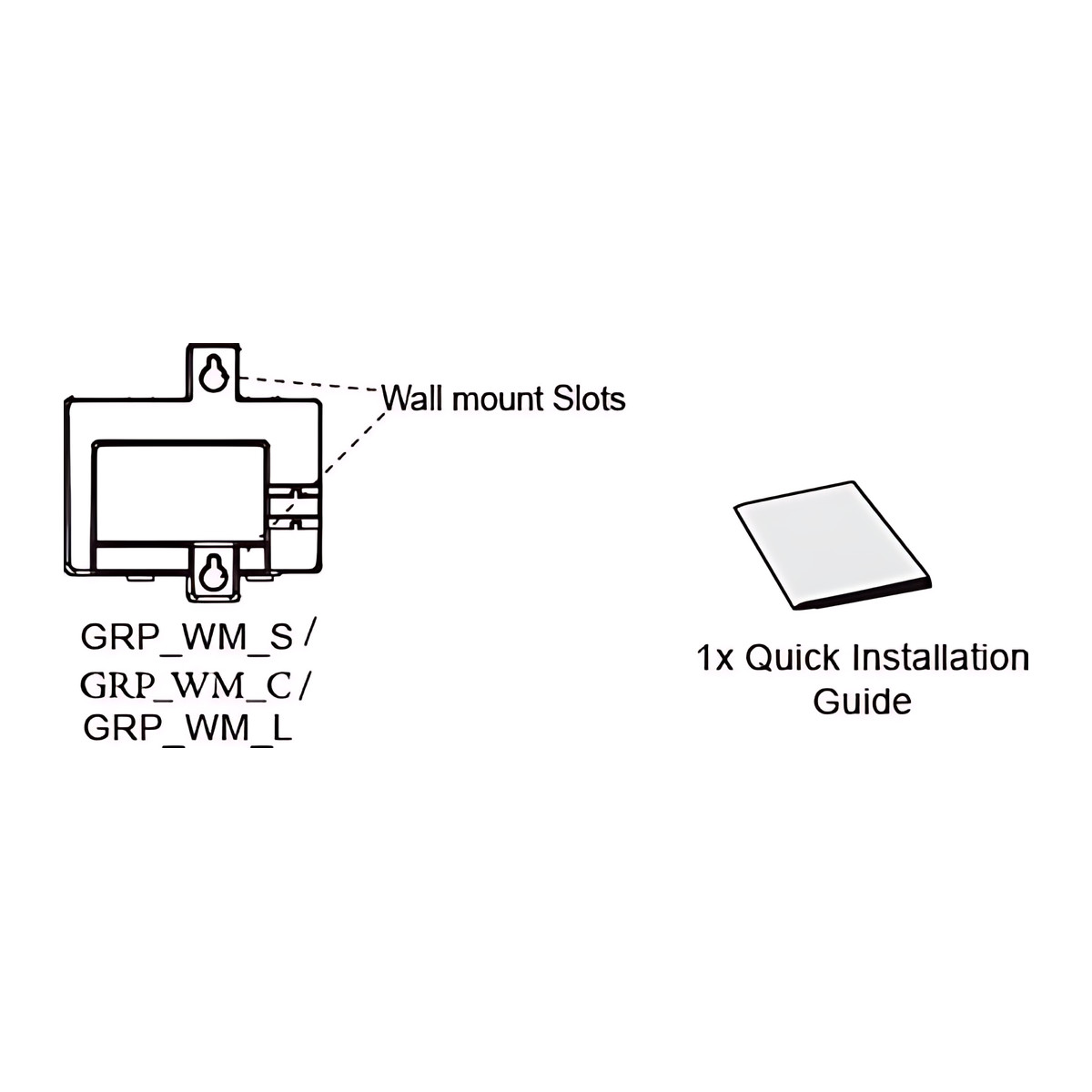
- GRP_WM_C wall mount bracket
- Quick installation guide
 Model GRP_WM_CCurrent model
Grandstream GRP_WM_C Wall Mount Bracket for GRP2650 and GRP2670 Phones
₹755 Incl. GST
₹640 + 18% GST
At a glance
- Compatible Phones
- GRP2650, GRP2670
- Mounting
- Wall, two vertical wall mount slots
Mounts a large-screen desk phone on the wall to free desk space at reception counters, nurse stations and back offices. Fits the GRP2650 and GRP2670 phones; clips on, screws and anchors not included.
- WarrantyManufacturer warranty under Grandstream's terms. Warranty claims
- DeliveryPrice, availability and delivery charges are confirmed in your quotation. Shipping and delivery
Overview
The Grandstream GRP_WM_C is a wall mount bracket that lets a GRP2650 or GRP2670 large-screen desk phone hang flat on a wall instead of sitting on a desk. It replaces the desk stand and holds the phone in corridors, reception counters, nurse stations, kitchens and back offices where a phone needs to be within reach but off the work surface. It fits the GRP2650 and GRP2670.
Is it right for you?
- Suits any place where a GRP2650 and GRP2670 needs to be on the wall: corridors, reception counters, nurse stations, lift lobbies, warehouses, kitchens and hotel back offices.
- Grandstream makes several GRP brackets that differ by phone size, so match the bracket to the exact phone model listed here. Other GRP models use a different bracket.
- The phone is not included.
Key features
- Fits the GRP2650 and GRP2670.
- Attaches without tools by sliding its ribs into the groove on the back of the phone and pressing it home.
- Two vertical wall mount slots for hanging on screws.
- The phone’s reversible hookswitch tab keeps the handset in place when the phone is vertical.
- Supplied with a quick installation guide.
What else you need
- Screws and wall anchors suited to the wall type: they are not included.
- A GRP2650 and GRP2670: the bracket is sold separately from the phone.
- A network cable or Power over Ethernet (PoE) run to the wall position.
Installation
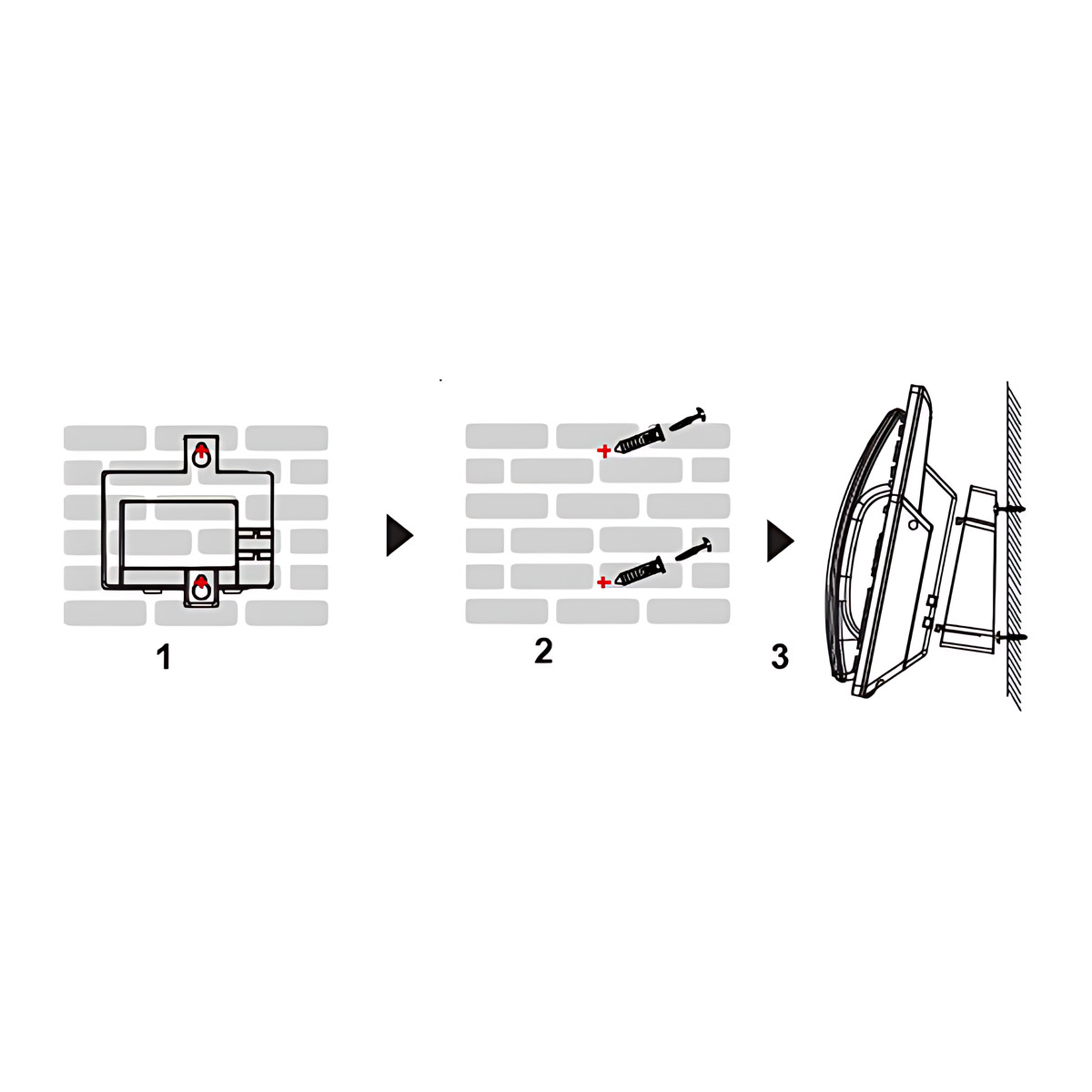
A handyman or the phone installer can fit it in a few minutes. Pull the hookswitch tab out of the handset cradle, rotate it so the extension points up and refit it, so the handset stays put when vertical. Slide the bracket ribs into the groove on the phone and press until it seats. Mark the two slot positions on the wall, drill and fit anchors and screws, then hang the phone on the screws. Plan the network cable or PoE run to the wall position in advance.
Before you buy
- Screws and wall anchors are not included.
- The phone is not included.
- Check the exact phone model: this bracket is for the GRP2650 and GRP2670 only.
Technical specifications
Key facts
- What is it?
- Phone Expansion Modules & AccessoriesBrand Grandstream, model GRP_WM_C
- How is it powered?
- Sold separately, not included with the phone
- What comes in the box?
- GRP_WM_C wall mount bracket; Quick installation guide
- Which documents are available?
- Installation guide Open documents
- Compatible Phones
- GRP2650, GRP2670
- Mounting
- Wall, two vertical wall mount slots
- Attachment
- Bracket ribs slot into the groove on the phone base and press to lock
- Handset Retention
- Turn the hookswitch tab to 'extension up' for wall use
- Supply
- Sold separately, not included with the phone
- Warranty
- Manufacturer warranty under Grandstream's terms. How claims work
Product attributes and shipping details
| Brand | Grandstream |
|---|
Downloads
Installation guide
- GRP_WM_C Wall Mount Quick Installation GuideInstallation guide · This model · 3.9 MBDownload
Series documents can differ from your exact model. Report a wrong or missing file
Works with this product
Works with
- Grandstream GRP2650 IP Phone, 14 Lines, 16 SIP, 5 Inch Colour, Wi-Fi 6GRP2650
Why Fits the GRP2650 for wall mounting.
- Grandstream GRP2670 Touch Screen IP Phone, 12 Lines, 16 SIP, 7 InchGRP2670
Why Fits the GRP2670 for wall mounting.
Questions about this product
Which phones does the GRP_WM_C fit?
The GRP2650 and GRP2670.
Are screws included?
No. Screws and wall anchors are not included, so buy fixings suited to your wall.
Does the handset fall off when the phone is on the wall?
Not if the hookswitch tab is reversed. Pull the tab out of the handset cradle, rotate it so the extension points up and push it back in.
Is the phone included?
No. The bracket is sold separately from the phone.
Do I need tools to attach the bracket to the phone?
No. The bracket ribs slide into the groove on the phone and press to lock. You need a drill and fixings for the wall.
Ask about this modelSetup, compatibility, what is in the box
Answers are automated. Do not enter personal or account details.
Looking for an alternative?
We list alternatives only when we have checked they suit the same job. Compare other models in the category, or ask us to suggest one for your site.