
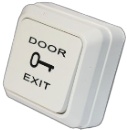
At a glance
- Contact Output
- NO / NC / COM
- Mounting
- Surface, back box included
- Housing Material
- Plastic
In the box
- Exit button
- Back box
 Model MPSM-1
MORX MPSM-1 Plastic Exit Button with Back Box (NO/NC/COM)
₹412 Incl. GST
₹349 + 18% GST
At a glance
- Contact Output
- NO / NC / COM
- Mounting
- Surface, back box included
- Housing Material
- Plastic
Plastic exit button with its own back box for surface mounting, for solid walls or retrofit jobs with no cavity behind the wall. Lets people leave an access-controlled door, with NO, NC and COM contacts for a controller or direct lock wiring.
- WarrantyManufacturer warranty under MORX's terms. Warranty claims
- DeliveryPrice, availability and delivery charges are confirmed in your quotation. Shipping and delivery
Overview
The MORX MPSM-1 is a plastic exit button supplied with its own back box, so it can be surface mounted where there is no cavity behind the wall or frame. It has normally open (NO), normally closed (NC) and common (COM) terminals, so it can signal a controller or switch a lock supply directly. It suits solid masonry walls, glass partitions with a side wall, and retrofit jobs where the cable runs on the surface.
Is it right for you?
- Suits a solid wall or any place with no cavity behind the button.
- Suits surface-run cable, as on retrofit jobs.
- Suits direct wiring in series with a fail-safe lock supply, thanks to the NC contact, within the rating marked on the button.
- For a flush fit in a hollow door or partition, the MORX MP-4 plastic button has published dimensions and rating but no back box.
Key features
- Plastic button housing.
- Back box included, so the button can be surface mounted.
- NO, NC and COM contacts for a controller exit input or direct lock wiring.
What else you need
- An access controller or standalone reader with an exit input, or a lock supply circuit to switch.
- A two- or three-core cable depending on whether the NC contact is used.
- No power supply: it is a switch with no electronics.
Installation
An access control installer or electrician should fit it. The back box is screwed to the wall, the cable enters the box, and the button plate is fixed over it. Dimensions and contact rating are not stated by the manufacturer, so confirm the back box size and the rating on receipt before planning cable entry and the switched load.
Before you buy
- Dimensions, contact rating and button mechanism are not stated by the manufacturer; confirm them on receipt.
- Keep the switched load within the rating marked on the button.
Technical specifications
Key facts
- What is it?
- Exit buttonBrand MORX, model MPSM-1
- How does it mount?
- Surface, back box included
- What comes in the box?
- Exit button; Back box
- Can SecurityGearHub help with installation?
- Setup guidanceManuals, wiring guides and answers to setup questions. On-site work is arranged separately where available. Ask about installation
- Which documents are available?
- On request. Ask us for the datasheet.
RelatedGuideAccess control door setup checklistDocumentsAll MORX documents
- Housing Material
- Plastic
- Contact Output
- NO / NC / COM
- Mounting
- Surface, back box included
- Warranty
- Manufacturer warranty under MORX's terms. How claims work
Product attributes and shipping details
| Brand | MORX |
|---|---|
| Button Type | Push |
Works with this product
Relevant accessories
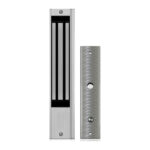
- MORX 600 lbs EM Lock with Timer and FeedbackEL-600
Why Exit button for a MORX 600 lbs EM lock door. Condition: Confirm the contact rating marked on the button.
₹2,267Add to cart
Questions about this product
Does it need a cavity behind the wall?
No. It comes with a back box for surface mounting.
Can it cut the power to an EM lock directly?
Yes, through the NC contact, within the rating marked on the button.
Does it need power?
No. It is a switch with no electronics.
What are its dimensions and rating?
Not stated by the manufacturer. Confirm the back box size and the contact rating on receipt.
Ask about this modelDoor fit, access methods, installation
Answers are automated. Do not enter personal or account details.
Looking for an alternative?
We list alternatives only when we have checked they suit the same job. Compare other models in the category, or ask us to suggest one for your site.