
At a glance
- Power
- 12 V DC, max. 0.6 A
- Relays
- 12
- Auxiliary inputs
- 2 ch dry contact
- Max. units per master
- 31
 Model OM-120Current model
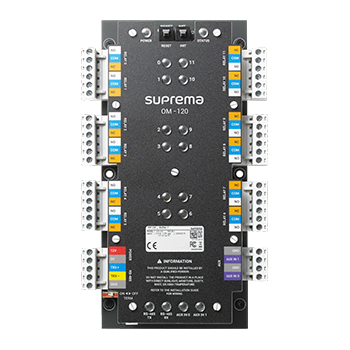
Suprema Output Module OM-120 with 12 Relays for Lift Control
Price on request
At a glance
- Power
- 12 V DC, max. 0.6 A
- Relays
- 12
- Auxiliary inputs
- 2 ch dry contact
- Max. units per master
- 31
Suprema OM-120 Output Module adds 12 relays to a Suprema access control system. It is used for lift (elevator) floor control in offices, hotels and apartment buildings, up to 192 floors per lift.
Include the required quantity and configuration in your quote request. Price and availability will be confirmed in the quotation.
- WarrantyManufacturer warranty under Suprema's terms. Warranty claims
- DeliveryPrice, availability and delivery charges are confirmed in your quotation. Shipping and delivery
Overview
The Suprema Output Module OM-120 adds 12 output relays to a Suprema access control system. Its main use is lift control: each relay can enable a floor button, so people only reach the floors they are allowed to visit.
Is it right for you?
Choose it for offices, hotels and residential buildings that want to control lift floors with cards or fingerprints. It also provides relay signals for zones, anti-passback and fire alarm links. Up to 31 units connect to one master device.
Key features
- 12 output relays per unit
- Lift control up to 192 floors per lift; Suprema BioStar can manage up to 1,000 lifts
- Anti-passback and fire alarm zone features
- Terminating resistance for RS-485 connections
- 2 dry contact auxiliary inputs
- Up to 31 units per master device over RS-485 (OSDP V2)
What else you need
- A Suprema CoreStation controller or Suprema terminal as the master device
- Readers in the lift car
- A 12 V DC power supply
- Wiring to the lift control panel, usually done with the lift maintenance company
Installation
Mount it indoors near the lift controller and connect it to the RS-485 daisy chain. Lift wiring should be carried out with the lift company.
Software and licences
Lift control is set up in Suprema BioStar 2; Suprema also lists BioStar X.
Before you buy
- It has no inputs for door control; it is an output module
- Lift integration depends on your lift panel; confirm with the lift company first
Technical specifications
Key facts
- What is it?
- Controller expansion moduleBrand Suprema, model OM-120
- How is it powered?
- 12 V DC, max. 0.6 A
- Does it support RS-485?
- Yes
- Does it support OSDP?
- YesOSDP v2
- Does it support Wiegand?
- No
- Can SecurityGearHub help with installation?
- Setup guidanceManuals, wiring guides and answers to setup questions. On-site work is arranged separately where available. Ask about installation
- Which documents are available?
- On request. Ask us for the datasheet.
- Not stated by the manufacturer
- PoE, capacity, software, box contents
General
- Relays
- 12
- Auxiliary inputs
- 2 ch dry contact
- Inputs
- Not supported
- Wiegand
- Not supported
- RS-485
- 1 ch, OSDP V2 compliant
- Max. units per master
- 31
- Lift control
- Up to 192 floors per lift
- CPU
- Cortex M3, 72 MHz
- Memory
- 128 KB flash, 20 KB SRAM
- LED
- Multi-colour
- Power
- 12 V DC, max. 0.6 A
Protection
- Tamper
- Not supported
Environment
- Operating temperature
- -20 to 60 °C
- Storage temperature
- -40 to 70 °C
- Operating humidity
- 0 to 95%, non-condensing
- Storage humidity
- 0 to 95%, non-condensing
Physical
- Dimensions (W x H x D)
- 90 x 190 x 21 mm
- Weight
- 300 g
Approvals
- Certifications
- CE, UKCA, KC, FCC, RoHS, REACH, WEEE
- Warranty
- Manufacturer warranty under Suprema's terms. How claims work
Questions about this product
What is it used for?
Mainly lift control: each of its 12 relays can enable a floor, up to 192 floors per lift.
How many can I connect?
Up to 31 units to one master device over RS-485.
Does it need a controller?
Yes. It works with a Suprema master device such as a CoreStation controller.
Ask about this modelSetup, compatibility, what is in the box
Answers are automated. Do not enter personal or account details.
Looking for an alternative?
We list alternatives only when we have checked they suit the same job. Compare other models in the category, or ask us to suggest one for your site.