
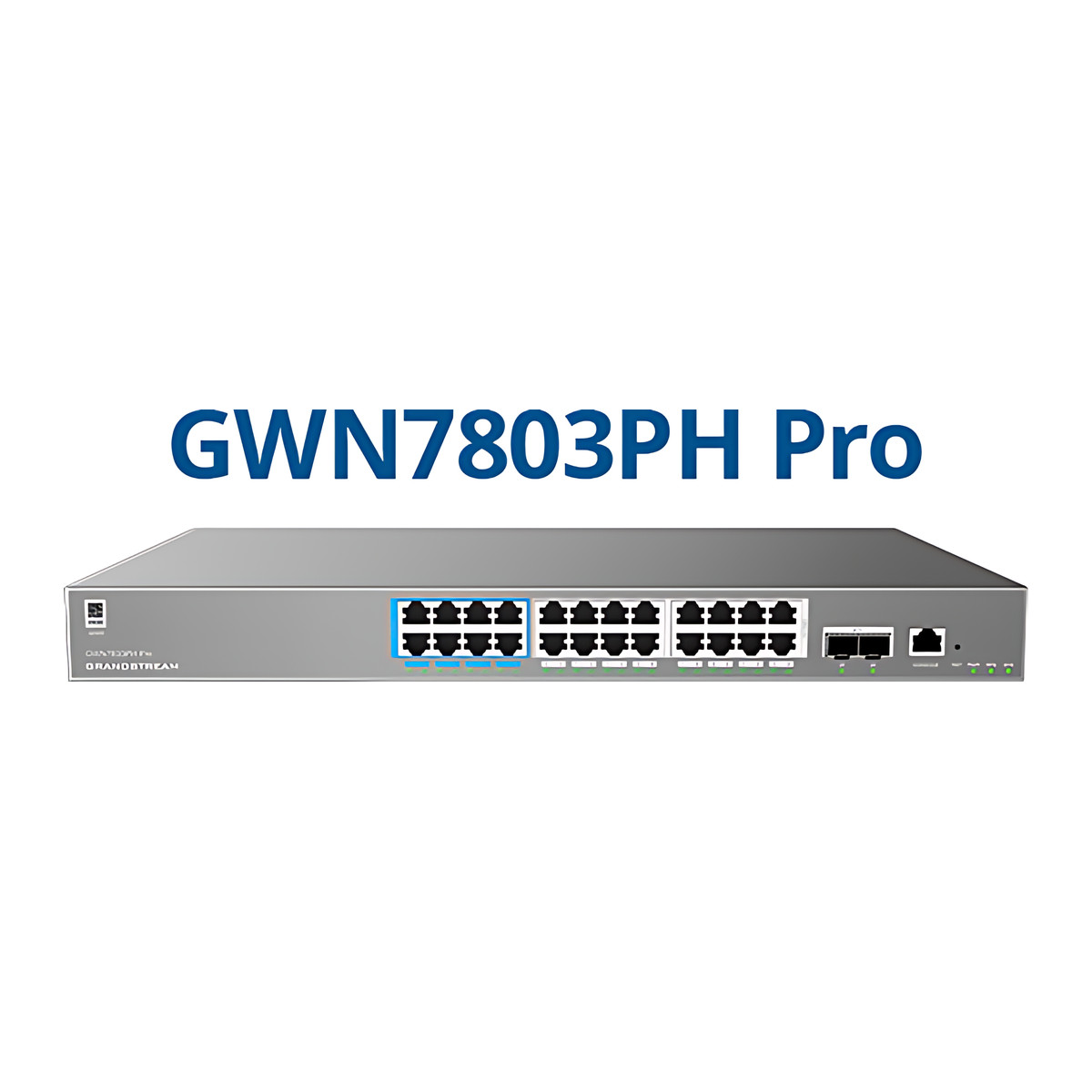
At a glance
- Ethernet Ports
- 24 x 10/100/1000 Mbps RJ45
- SFP Ports
- 2 x 10G SFP+
- PoE Budget
- 400 W
- Switching Capacity
- 88 Gbps
- Layer
- Layer 2++ managed
- Mounting
- Desktop, Rack Mount
 Model GWN7803PH ProCurrent model
Grandstream GWN7803PH Pro Managed PoE++ Switch, 24 GbE + 2 x SFP+, 400 W
₹50,598 Incl. GST
₹42,880 + 18% GST
At a glance
- Ethernet Ports
- 24 x 10/100/1000 Mbps RJ45
- SFP Ports
- 2 x 10G SFP+
- PoE Budget
- 400 W
- Switching Capacity
- 88 Gbps
- Layer
- Layer 2++ managed
- Mounting
- Desktop, Rack Mount
A managed switch for offices, hotels, schools and audio-visual installations that power phones, cameras and higher-power access points. 24 Gigabit Power over Ethernet (PoE) ports, PoE++ up to 60 W on selected ports, 400 W budget, two 10 Gbps SFP+ uplinks.
Part of the Grandstream GWN7800 Pro Series. Compare all 7 models
- WarrantyManufacturer warranty under Grandstream's terms. Warranty claims
- DeliveryPrice, availability and delivery charges are confirmed in your quotation. Shipping and delivery
Overview
The Grandstream GWN7803PH Pro is a managed network switch that connects and powers phones, cameras and Wi-Fi access points in an office, hotel or school from one box. Its 24 Gigabit ports supply Power over Ethernet (PoE), so those devices need no separate power adapters, and Two 10 Gbps SFP+ ports link it to the rest of the network over fibre. It is made for networks that an IT team or installer sets up and manages, with extra features for audio and video over IP.
Is it right for you?
- Suits offices, hotels, schools and audio-visual installations that need separate networks (VLANs), multicast control for video or audio over IP, and PoE for phones, cameras and access points from the same switch.
- The 400 W PoE budget is shared across all 24 PoE ports: the eight 60 W ports and the sixteen 30 W ports all draw from it. Add up the expected load before choosing.
- Choose it over the GWN7803PL Pro when some devices, such as high-power access points, need more than 30 W: ports 1 to 8 supply up to 60 W.
- For 48 ports, see the GWN7806PL Pro or GWN7806PH Pro.
- Routing is limited to static routes (Grandstream classes it as Layer 2++). If you need dynamic routing between many networks, choose a Layer 3 switch.
Key features
- 24 Gigabit RJ45 ports with PoE: ports 1 to 8 IEEE 802.3af/at/bt up to 60 W, ports 9 to 24 IEEE 802.3af/at up to 30 W, 400 W in total.
- Two 10 Gbps SFP+ uplinks and 88 Gbps switching capacity (65.472 Mpps forwarding rate), so the links to the core do not slow the network down.
- Layer 2++: full Layer 2 control plus static routing (32 IPv4 and 32 IPv6 routes).
- 4K VLANs, QinQ, MAC and protocol VLANs, VLAN translation, voice VLAN and ERPS ring protection for separating traffic and keeping links up.
- Pro AV mode with IGMP (Internet Group Management Protocol) and MLD snooping, so multicast audio and video streams reach only the ports that need them.
- IEEE 1588v2 transparent clock for precise time synchronisation across the network.
- 802.1X, RADIUS and TACACS authentication, ARP inspection, IP source guard and DHCP snooping to keep unauthorised devices off the network.
What else you need
- A mains socket: the power supply is built in and accepts 100 to 240 V AC.
- SFP+ modules for the 10 Gbps uplinks: these are not included. Grandstream’s F-MM850-300M-10G (multimode fibre, up to 300 m) and F-SM1310-10KM-10G (single-mode fibre, up to 10 km) match the port speed.
- No extra software is needed for local management: the web UI and command-line interface (CLI) are built in. For central management use GDMS Networking (cloud), GWN Manager (on-premises), a GWN series router or the GWN App.
Installation
A network installer or IT team should fit and configure it. It mounts on a desk or in a rack; the rack kit, a ground cable and a power cord anti-trip clip are supplied. Connect the ground cable, allow airflow and keep the room between 0 and 45 °C. Plan the VLANs and the PoE allocation before connecting devices. The unit measures 440 x 300 x 44 mm and weighs 4.15 kg.
Software and licences
Management is through the local web UI, the CLI, SNMP v1/v2c/v3, GDMS Networking in the cloud, GWN Manager on your own server, a GWN series router or the GWN App. Local management works without an internet connection; GDMS Networking needs one.
Before you buy
- All 24 PoE ports share the 400 W budget, so total the power draw of every phone, camera and access point you plan to connect.
- Only ports 1 to 8 supply up to 60 W (PoE++); connect high-power devices to those ports.
- SFP+ modules are not included.
- Rated for 0 to 45 °C; place it in a ventilated equipment room or cabinet.
Technical specifications
Key facts
- What is it?
- Network switchBrand Grandstream, model GWN7803PH Pro
- How is it powered?
- 100 to 240 V AC
- How does it mount?
- Desktop, Rack Mount
- Does it support PoE?
- Yes400 W budget, PoE++ (IEEE 802.3bt), PoE+ (IEEE 802.3at), PoE (IEEE 802.3af)
- Which documents are available?
- Quick start guide, user guide, datasheet, software (4), firmware Open documents
- Not stated by the manufacturer
- box contents
RelatedSeriesGrandstream GWN7800 Pro Series, 7 modelsDocumentsAll Grandstream documents
- Layer
- Layer 2++ managed (Grandstream designation)
- Ethernet Ports
- 24 x 10/100/1000 Mbps RJ45
- SFP Ports
- 2 x 10G SFP+
- PoE Ports
- 24: ports 1 to 8 IEEE 802.3af/at/bt up to 60 W, ports 9 to 24 IEEE 802.3af/at up to 30 W
- PoE Budget
- 400 W
- Switching Capacity
- 88 Gbps
- Forwarding Rate
- 65.472 Mpps
- Management
- Local web UI (embedded controller), CLI, SNMP v1/v2c/v3, GDMS Networking (cloud), GWN Manager (on-premises), GWN series routers, GWN App
- Routing
- Static routing, 32 IPv4 and 32 IPv6 routes
- Power Input
- 100 to 240 V AC, 50/60 Hz, integrated power supply
- Mounting
- Desktop, Rack Mount
- Dimensions
- 440 x 300 x 44 mm (L x W x H)
- Weight
- 4.15 kg
- Operating Temperature
- 0 to 45 °C
- Warranty
- Manufacturer warranty under Grandstream's terms. How claims work
Product attributes and shipping details
| Brand | Grandstream |
|---|---|
| Ports | 24 x GigE + 2 x SFP+ |
| Connectivity | Fiber (SFP+), PoE, Ethernet |
| Supply Voltage | 100 to 240 V AC |
| PoE standard | PoE (IEEE 802.3af), PoE+ (IEEE 802.3at), PoE++ (IEEE 802.3bt) |
| PoE role | PoE output (PSE) |
Downloads
Download software
- Grandstream GWN7800 Pro Series software (GWN app (iOS))Version 1.17.4 · iOS 13.0+ · Released August 27, 2026Prerequisites: GDMS Networking or GWN Manager; Mobile management with GDMS Networking or GWN ManagerLicence: FreeSoftware · Family · apps.apple.comView official download page
- Grandstream GWN7800 Pro Series software (GWN app (Android))Version 1.0.17.4 · Android 7.0+ · Released August 25, 2026Prerequisites: GDMS Networking or GWN Manager; Mobile management with GDMS Networking or GWN ManagerLicence: FreeSoftware · Family · play.google.comView official download page
- GDMS Networking (GWN.Cloud)Web; GDMS/GWN mobile appsPrerequisites: Device MAC and password from label; Cloud controller for GWN seriesLicence: Free; account requiredSoftware · Family · grandstream.comView official download page
- GWN ManagerVersion 1.1.39.8 · Linux server (AlmaLinux 9, Ubuntu, CentOS 7) as tar.gz or OVAPrerequisites: On-premise Linux server or VM; On-premise alternative to GDMS NetworkingLicence: FreeSoftware · Family · grandstream.comView official download page
Documentation
- GWN7800 Pro Series DatasheetDatasheet · Family · 1.4 MBDownload
User manual
- GWN780x Pro Managed Switches User ManualUser guide · This model · 15.0 MBDownload
Installation guide
- GWN780x Pro Quick Installation GuideQuick start guide · This model · 1.9 MBDownload
Firmware
- Grandstream product pageVersion 1.0.17.11 · n/a (device firmware)Prerequisites: Read release notes and warnings in the row (downgrade limits, backups); Firmware update only from this exact model row; read release notes firstLicence: FreeFirmware · Family · grandstream.comView official download page
Series documents can differ from your exact model. Report a wrong or missing file
Works with this product
Other models in the series
- Grandstream GWN7801P Pro Managed PoE+ Switch, 8 GbE + 2 x SFP, 130 WGWN7801P Pro
Why Same GWN7800 Pro Series family; differs in ports, PoE or power.
₹21,901Add to cart - Grandstream GWN7802P Pro Managed PoE++ Switch, 16 GbE + 2 x SFP+, 250 WGWN7802P Pro
Why Same GWN7800 Pro Series family; differs in ports, PoE or power.
₹37,005Add to cart - Grandstream GWN7803 Pro Managed Switch, 24 GbE + 2 x 10G SFP+GWN7803 Pro
Why Same GWN7800 Pro Series family; differs in ports, PoE or power.
₹27,942Add to cart - Grandstream GWN7803PL Pro Managed PoE+ Switch, 24 GbE + 2 x SFP+, 250 WGWN7803PL Pro
Why Same GWN7800 Pro Series family; differs in ports, PoE or power.
₹41,536Add to cart - Grandstream GWN7806PL Pro Managed PoE+ Switch, 48 GbE + 6 x SFP+, 400 WGWN7806PL Pro
Why Same GWN7800 Pro Series family; differs in ports, PoE or power.
₹82,317Add to cart - Grandstream GWN7806PH Pro Managed PoE++ Switch, 48 GbE + 6 x SFP+, 720 WGWN7806PH Pro
Why Same GWN7800 Pro Series family; differs in ports, PoE or power.
₹109,504Add to cart
Questions about this product
What is the total PoE budget of the GWN7803PH Pro?
400 W, shared across all 24 PoE ports.
Which ports support PoE++?
Ports 1 to 8, at up to 60 W each (IEEE 802.3bt). Ports 9 to 24 supply up to 30 W.
Does it need an internet connection?
No. The web UI and CLI work on the local network. Cloud management through GDMS Networking needs an internet connection.
How is the switch managed?
Locally through the web UI or CLI, or centrally through GDMS Networking (cloud), GWN Manager (on-premises), a GWN router or the GWN App.
What is Pro AV?
A Grandstream feature set for audio-visual over IP networks. It uses IGMP and MLD snooping and QoS to handle multicast streams.
Are SFP+ modules included?
No. Grandstream's F-MM850-300M-10G (multimode) and F-SM1310-10KM-10G (single-mode) modules match the 10 Gbps ports.
Ask about this modelSetup, compatibility, what is in the box
Answers are automated. Do not enter personal or account details.
Looking for an alternative?
We list alternatives only when we have checked they suit the same job. Compare other models in the category, or ask us to suggest one for your site.